MiSTer FPGA in 2026: Which One to Buy and How to Set It Up
The short answer. If you want one box that works out of the packaging, buy a SuperStation One ($249 from Retro Remake) or a MiSTer Pi Turbo Pack ($225, pre-order). If you want the reference hardware that MiSTer is designed and tested on, buy a Terasic DE10-Nano ($225 direct) and add a 128MB SDRAM board, a USB hub and cooling. Then install the software with Mr. Fusion (or the SuperStation's own installer), run update_all, and set video_mode, vsync_adjust and vscale_mode in MiSTer.ini. Controller mapping is changing too: joymap v4, merged on 3 November 2026, adds L2, R2, L3 and R3 slots and analog triggers, but so far it is only in unstable builds.
This guide covers the state of things on 6 November 2026, from the clone boards to the N64 core's 64DD support, Jotego's CPS3 core and the new controller mapping. It gives a source for every version number, price and menu name.
What this guide was checked against (6 November 2026)
- MiSTer Main (stable):
MiSTer_20261010, the binary the official Distribution currently ships (Main_MiSTer releases folder, Distribution_MiSTer).- MiSTer Main (unstable):
MiSTer_unstable_20261103_09afa4, the first build with joymap v4, andMiSTer_unstable_20261105_1852ef(unstable-builds release).- Linux:
linux_release_20260912, the newest image in the official Distribution.- Update All:
UpdateAll_2026-10-09(releases).- Mr. Fusion: v2.10, 13 May 2025 (releases).
- SuperStation SD Card Installer: 1.2, 24 July 2026 (releases).
- Core versions: listed per core in the cores table.
- Prices and stock: checked on each seller's own page on 6 November 2026, in the seller's currency.
Rob's hardware for this guide is a SuperStation One. The DE10-Nano and MiSTer Pi steps are reference material from the official documentation and have not been run on that hardware here.
What is MiSTer FPGA?
MiSTer is an open-source project that recreates consoles, computers and arcade boards as hardware circuits on an FPGA, rather than running them as software. Cart & Pixel's explainer on FPGAs and retro gaming covers how that works.
The practical points before you buy:
- The reference board. MiSTer is built around the Terasic DE10-Nano, which pairs an Altera Cyclone V SE
5CSEBA6U23I7FPGA (110K logic elements) with an 800MHz dual-core ARM Cortex-A9 and 1GB of DDR3 (Terasic specifications). The ARM side runs Linux, the menu and file handling; the FPGA becomes the console. - Cores. Each system is a "core", a
.rbffile. Arcade games load through.mrafiles that point at a core. - Scale. On 6 November 2026 the official Distribution held 55 console cores, 95 computer cores and 207 arcade core files, plus 739 top-level arcade
.mraentries (Distribution_MiSTer).
If you mainly want handheld FPGA play, the Analogue Pocket's openFPGA platform is the other route; see the Analogue Pocket review.
Which MiSTer should you buy in 2026?
Prices and contents compared (6 November 2026)
| DE10-Nano (Terasic) | MiSTer Pi | SuperStation One | MiSTer Multisystem 2 | |
|---|---|---|---|---|
| Price | $225 direct, $190 academic (Terasic); $294.60 at DigiKey (DigiKey) | RAM Bundle $150, Turbo Pack $225, pre-order, "ships in November" (Retro Remake) | Batch 5 $249 (sold out); Transparent Collection $249, pre-order, "Orders ship in December" (Batch 5, Transparent) | Digital £228, Analogue £276, including VAT (Heber shop) |
| What's in the box | Board, quick start guide, two USB cables, 5V adapter, microSD card, feet (kit contents) | RAM Bundle: board v1.7, 128MB SDRAM, Fan IO board, NES SNAC adapter, PD cable, acrylic top. Turbo Pack swaps the Fan IO board for the A/V Pro v9.2 and adds a USB hub, a 16GB card, a WiFi/BT adapter and an acrylic shell | Console, microSD (64GB on Batch 5, 16GB on Transparent), HDMI cable, USB-C cable | Own Cyclone V system board with 128MB SDRAM and 1GB LPDDR, in a 3D-printed case (product page) |
| Video out | HDMI; analog needs an IO board or a Direct Video DAC | HDMI up to 1536p; VGA via the A/V Pro board (Turbo Pack) | HDMI (1536p/1440p), VGA, DIN10, composite, component (specs) | HDMI on both; the Analogue version adds 9-pin mini-DIN RGB and VGA |
| Controller ports | One micro USB OTG port | USB via hub; SNAC through the IO board | Two PS1 controller and memory card ports (SNAC), 3x USB-A | Seven USB ports (five front, two rear); SNAC cartridges on the Analogue version |
| SDRAM | Not included | 128MB included | 128MB built in | 128MB built in |
| You still need | 128MB SDRAM, USB hub or OTG adapter, cooling, case; IO board for analog or SNAC | A USB-C power supply (5V 2A minimum); RAM Bundle buyers also need a USB hub | A USB-C PD power supply; USB controllers or original PS1 pads | A power supply (Heber lists a Mean Well 5V 4A unit at £23.99) |
Stock moves quickly, so check the store before you plan around any of these. On the morning of 6 November, Retro Remake's pages let you pre-order both MiSTer Pi bundles, two of five Transparent Collection colours (Frost and Watermelon) and two of three SuperDock colours. Batch 5 was sold out in every variant. Later checks the same day disagreed: one found the MiSTer Pi, Transparent Collection and SuperDock pages all showing "Sold out", and the next, that afternoon, found the Transparent Collection pre-order open again at $249 while Batch 5 stayed sold out.
The documentation says "MiSTer is designed and tested with the DE10-Nano board"; clones "can aim for compatibility", with support left to the seller (MiSTer docs: requirements). The project's list of sellers flags Retro Remake as using "a clone board of the DE10-Nano, not the real Terasic DE10-Nano" (MiSTer docs: add-ons).
Terasic DE10-Nano: the reference board
The DE10-Nano is the board every core developer targets, which is the strongest argument for it. DigiKey quotes a 56-week manufacturer lead time for new stock. MiSTer Addons' pre-configured DE10-Nano bundle in its aluminium case is $475 and was sold out (MiSTer Addons).
What a DIY build costs. Priced at MiSTer Addons on 6 November, the parts for a full build come to $390 before shipping and a case:
| Part | Price | Stock on 6 November |
|---|---|---|
| DE10-Nano (Terasic, includes a 5V adapter and a microSD card) | $225 | Listed; DigiKey had 380 |
| 128MB SDRAM (MiSTer Addons) | $50 | Sold out |
| USB Hub with bracket (MiSTer Addons) | $50 | In stock |
| IO Analog Pro or IO Direct board with fan and heatsink (Analog Pro, IO Direct) | $65 | Sold out |
Retro Remake's $20 SDRAM module and $20 USB hub (search listing), which it lists as compatible with other MiSTer boards, bring a DE10-Nano with SDRAM and a hub, but no IO board, to $265.
MiSTer Pi: the cheap development board
Retro Remake's MiSTer Pi is a Cyclone V board with 1GB of DDR3 that takes the standard MiSTer add-ons; Retro Remake calls it "a fully compatible MiSTer FPGA development board" (Retro Remake). The Turbo Pack's A/V Pro v9.2 board has a 24-bit ADV7125 video DAC, VGA, a SNAC port and a fan. The board needs at least 5V 2A; a USB-C PD charger negotiates up to 12V 3A, which adds heat (Retro Remake firmware and setup).
SuperStation One: the consolised clone
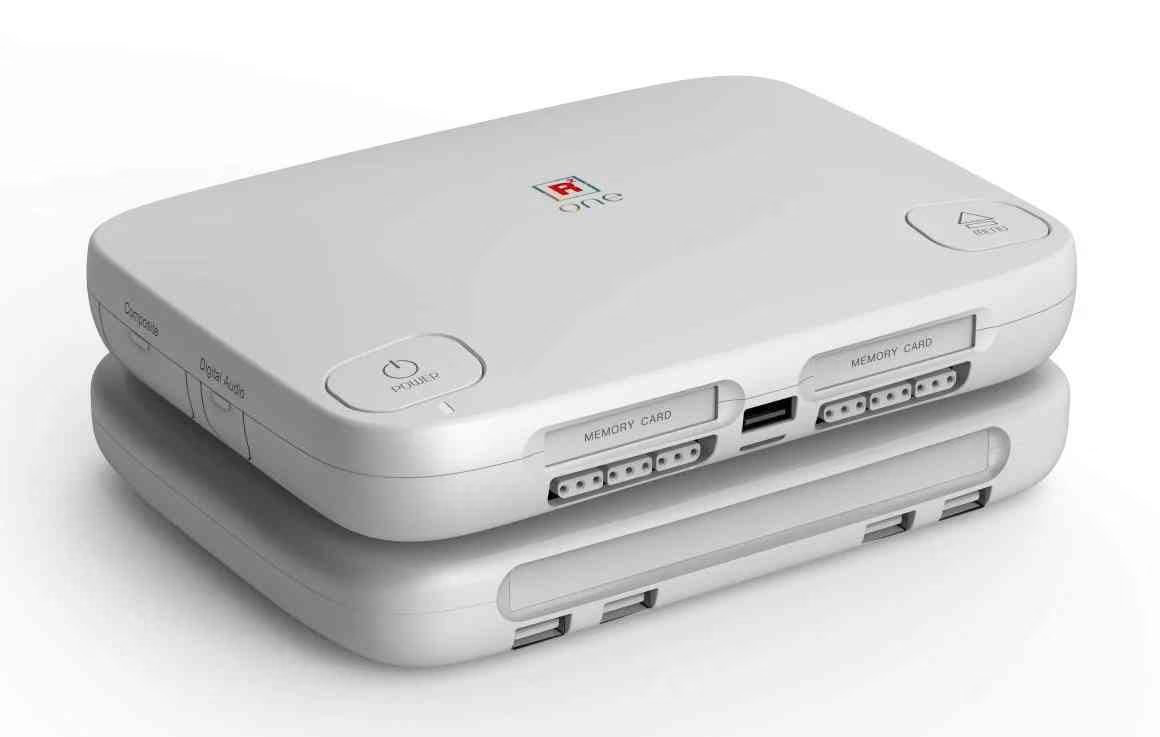
The SuperStation One is a PlayStation-styled MiSTer from Retro Remake. Beyond what the table lists, it has a 24-bit video DAC, 3.5mm and TOSLINK audio, Ethernet, a TF card slot and an expansion slot for the SuperDock (Retro Remake).
The Transparent Collection has a pre-installed fan but "does not include built-in WiFi/BT or an NFC reader". The $50 SuperDock adds a DVD drive, an unpopulated NVMe M.2 2280 slot, four USB ports, a SNAC bypass port and an IR remote (SuperDock). No power supply is included; Retro Remake recommends a 9V 3A USB-C PD charger and warns against the original Nintendo Switch one (SuperStation documentation).
MiSTer Multisystem 2: a complete system on its own board
Heber's Multisystem 2 has a "custom-built system board with an integrated Cyclone V FPGA processor" instead of a DE10-Nano, a powered seven-port USB hub and passive cooling. The Analogue version adds 3.5mm and TOSLINK audio, Ethernet and a cartridge slot for SNAC adapters (Multisystem 2 product page).
What if everything is sold out?
All four sell in batches. If yours is gone, build on a DE10-Nano: the documentation lists Terasic, DigiKey and Mouser as sources (MiSTer docs: requirements). For add-ons, its seller list adds UltimateMiSTer.com (Portugal), MiSTerFPGA.co.uk (UK), AntonioVillena.com and ManuFerHi.com (Spain), LegacyPixels.com (USA), CAMInventions.com (Australia) and RetroCastle (China). The documentation says the list "is not an official endorsement of any sellers" (MiSTer docs: add-ons), and Cart & Pixel has not checked their stock. The Multisystem 2, sold directly by Heber, is the other route.
What add-ons does a MiSTer need?

Do you need the 128MB SDRAM module?
Yes, for any serious use. The documentation calls the SDRAM board "essential for multiple cores to even load games" (MiSTer docs: add-ons). SDRAM exists because the board's DDR3 has variable latency, which breaks cores that need reliable read and write timing (MiSTer docs: FAQ). The console core list marks SDRAM as required for the SNES, NES, Game Boy, Mega CD, Neo Geo, N64, PlayStation and Saturn cores, among many others (console cores).
Size matters for some cores:
| Core | SDRAM requirement (from the core's own README) |
|---|---|
| N64 | Any size, but a 32MB module only runs cartridges up to 16MB (N64_MiSTer) |
| PlayStation | Any size; a black screen with "ED" in the corner can mean no SDRAM is fitted (PSX_MiSTer) |
| Saturn | 128MB primary module; a second module of 32MB to 128MB is recommended "for better compatibility" (Saturn_MiSTer) |
| Neo Geo | About 84% of the library fits 32MB, another 12% fits 64MB, and 8 games need 128MB (NeoGeo_MiSTer) |
| Jaguar | Required; one module's latency is "a bit too high" for more games to run cycle-accurately (Jaguar_MiSTer) |
| CPS3 (Jotego) | At least 64MB. New Generation, Red Earth and JoJo's Venture fit in 64MB; 2nd Impact and JoJo's Bizarre Adventure (66,048kB) and 3rd Strike (82,432kB) need 128MB (jtcores CPS3) |
Buy 128MB; every bundle in the comparison table already includes it.
What about dual SDRAM?
Some cores run better or only with two SDRAM modules. Update All offers a "Dual RAM Console Cores" database whose README says the cores "require two SDRAM boards to function"; it currently carries Saturn, Jaguar and PSX builds (Dual-Ram-Console-Cores). On a DE10-Nano, the Analog IO board uses the second SDRAM header, so it rules out dual SDRAM; the Digital IO board leaves the header free (MiSTer docs: add-ons). The MiSTer Pi's A/V Pro board allows dual RAM only "by removing AV". The SuperStation One and Multisystem 2 each have one built-in module, so dual-SDRAM builds are not an option on either.
IO board, USB hub, cooling and power
- USB. The DE10-Nano has one micro USB OTG port, so you need either the USB Hub add-on (six USB 2.0 ports plus one power-only port) or a USB OTG adapter. "No USB devices will work" without one (MiSTer docs: requirements, add-ons).
- Digital IO board. Adds OSD, User and Reset buttons, a secondary SD slot, TOSLINK, the SNAC user port and a fan header.
- Analog IO board. Adds VGA output alongside HDMI, sync-on-green, 3.5mm audio and a power switch.
- Cooling and power. A 20mm to 22mm heatsink is enough, and a fan "helps but is not strictly required". Power is 5V at 2A or more through a 5.5mm by 2.1mm centre-positive plug, or 4A to 5A with a hard drive (MiSTer docs: FAQ).
HDMI, Direct Video or analog IO?
MiSTer has three ways to reach a display:
- HDMI through the scaler. The default, for a modern TV.
- Analog from an IO board or a built-in DAC, for CRTs and upscalers. The SuperStation One and the Analogue Multisystem 2 have this built in.
- Direct Video.
direct_video=1sends the core's raw timing over HDMI to a cheap AG6200 or AG6201 HDMI-to-VGA DAC, the cheapest analog route on a bare DE10-Nano. It "IS NOT standard HDMI", so a normal TV will not show it, and the docs advise against hot-plugging the DAC (MiSTer docs: Direct Video).
What size and format of SD card?
- Size. The documented minimum is 4GB (MiSTer docs: requirements). That covers the system only; CD-based games need far more, or a USB drive.
- Format. The installer leaves an exFAT partition named "MiSTer" that most computers can read, so you can copy games across directly (MiSTer docs: games).
- SuperStation One. Before re-flashing, erase every partition and reformat to a single exFAT partition (SuperStation documentation). Installer 1.2 improved reliability with Samsung Evo Plus cards (installer releases).
How do you set up a MiSTer from scratch?
DE10-Nano and MiSTer Pi: flash Mr. Fusion
Mr. Fusion is "a tiny, custom Linux distribution designed to run on the DE10-Nano and install MiSTer" (mr-fusion). The current release is v2.10 from 13 May 2025, which packages MiSTer release_20250402 (mr-fusion releases); the first update brings everything current.
- Download
mr-fusion-v2.10.img.zipfrom the releases page. - Flash it with balenaEtcher, Apple Pi Baker, Win32 Disk Imager or
dd. The README accepts cards of 2GB or more, but use at least the documented 4GB. - Optional: put a
wpa_supplicant.confwith your WiFi details, or asamba.sh, in the root of the freshly flashed card. Mr. Fusion copies them into place, so you need no keyboard for WiFi. - Put the card in the DE10-Nano's own slot underneath, not the IO board's secondary slot, and power on (MiSTer docs: software).
- The card is repartitioned and expanded, and the board reboots to the MiSTer menu. The README says this "should not take more than 90 seconds". If nothing appears after two minutes, start again.
MiSTer Pi owners can use Retro Remake's "Offline Install Package" instead, linked from its firmware page (MiSTER-Pi-Offline-Stock).
SuperStation One: use Retro Remake's installer
The SuperStation One ships with a card already set up, but Retro Remake's documentation says "The SD cards shipped with most units are incorrectly partitioned". The two partitions overlap, which can cause a sudden black screen after you add games. Its advice is to flash the newest image from the SuperStation SD Card Installer (SuperStation documentation).
- Back up
/games/,/saves/and/savestates/from the existing card if you have used it. - Download the latest release. Version 1.2 (24 July 2026) comes as
SuperStation_1.2.0.img.ziporSuperStation_1.2.0-ConsoleMode.img.zip, the second with Retro Remake's Console Mode launcher (releases). - Erase the card fully, then flash with balenaEtcher or Rufus.
- Insert the card, power on and wait. The installer finishes by rebooting into MiSTer; if it does not, flash again (installer README).
Version 1.2 adds CRT support for the installer, Switch Online controller pairing, Bluetooth 4.2 and a WPA3 fix. It carries a Linux build from commit 24ecf64, with /MiSTer.version set to 050402 so that update.sh does not downgrade it (Linux_Image_creator commit).
First boot: the menu, the OSD and a keyboard
The main menu is a core of its own. Plug in a USB keyboard for the first session.
- F12 opens the on-screen display (OSD), and Alt+F12 opens the core list.
- Left in the OSD shows the information screen, with the current INI file and the volume. Right opens the system screen (MiSTer docs: hotkeys).
- Win+PrtSc saves a scaled screenshot to
/screenshots/<core>/, and Shift+Win+PrtSc saves the raw core output (MiSTer docs: FAQ).
On a SuperStation One, the Eject/Menu button opens the menu. Holding it for several seconds, or pressing F11 on a keyboard, opens Bluetooth pairing (Retro Remake firmware and setup).
Networking: Ethernet, WiFi and file transfer
- Ethernet works out of the box.
- WiFi on a DE10-Nano needs a compatible USB adapter. Run the
wifiscript from the Scripts menu, pick your network and type the password. The documentation lists adapters users report working (MiSTer docs: WiFi). - WiFi on a SuperStation One. Press Esc and go to Scripts, then WiFi (Retro Remake firmware and setup). The Transparent Collection has no built-in WiFi, so it needs an adapter.
- File transfer. Once online, you can copy games over FTP or SFTP, log in over SSH, or mount CIFS and NFS shares (MiSTer docs: network).
How do you update a MiSTer with update_all?
The built-in update script (the MiSTer Downloader) installs and updates cores, the menu, the Main binary and Linux from the official Distribution (Downloader_MiSTer). Update All runs that same Downloader "under the hood" and lets you add more databases from a settings screen (Update_All_MiSTer). Most people use Update All.
Installing and running update_all
- Download
update_all.zipfrom the project's latest release. - Put
update_all.shin/Scriptson the SD card. It updates itself after that. - Run it from the Scripts menu.
The README says the first run takes "around 15 minutes", and later runs much less.
The settings screen, menu by menu
Press Up during the countdown that appears when update_all starts to open the settings screen. Choose SAVE before you leave, or your changes are lost (Update_All README). The top level of the current screen has these entries (settings_screen_model.py):
| Menu entry | What it controls |
|---|---|
| Main Distribution | Which official file set to follow: the default MiSTer-devel set with Linux pinned to a reviewed release, the "Edge Linux" set, the DB9/SNAC8 fork, or Aitor Gómez's fork |
| JTCORES for MiSTer | Jotego's cores, plus "Install Private Releases" for Patreon beta builds |
| Other Cores | Coin-Op Collection (on by default), LLAPI, Y/C builds, Alt Cores, Dual RAM Console Cores, RetroAchievements cores, Physical CD Support and more |
| Frontends | Replacement console-style interfaces for the menu |
| Tools & Scripts | Arcade Organizer, Names TXT, Zaparoo, MiSTer Extensions, Super Attract Mode, Analogue Pocket tools |
| Extra Content | Labelled "ROMs, BIOS & Wallpapers": artwork, manuals, wallpapers, borders, and BIOS and ROM databases |
| Patrons Menu | Extras for the author's Patreon supporters |
| System Options | Update All's own behaviour |
The default Main Distribution pins Linux to linux_release_20260912 (MultiDatabases pinned Linux). The official Distribution's database ships the same image, so on 6 November the pin held nothing back; it matters only once a newer Linux is released.
A plain warning about Extra Content. That menu includes a "BIOS Database" ("BIOS files for your systems") and an "Arcade ROMs Database" ("ROMs for Arcade Cores"), and other entries fetch boot ROMs. They download copyrighted firmware and game data. Leave them off and use dumps from hardware you own; Cart & Pixel does not walk through those options. Jotego's licence says the same: his cores may only be used with ROMs "you legally own" (jtbin). Devices like Epilogue's Operator range dump your own cartridges to a file.
Useful downloader.ini settings
Update All writes your choices to /media/fat/downloader.ini. Two Downloader options are worth knowing (Downloader_MiSTer):
storage_priority = 'prefer_external'installs game files to a USB drive or network share instead of the SD card. Linux and system files always stay on the SD card.filter = ...stops categories from downloading. Retro Remake's documentation gives the examplefilter = !mister_example-ini !zxspectrum !spectrum !zxnext !zx81 !vectrex, which stops the example INI and a handful of unwanted cores coming back (SuperStation documentation).
Update All on the SuperStation One
Retro Remake says "YES, Update_All is safe to use on the Super Station One!", but warns that it can make extensive changes. If you then see warnings about lookahead, VRR or HDMI-CEC, replace the factory INI files with the updated ones in its documentation repository. The card ships with open-source replacement BIOS files, which Update All leaves alone unless file_checking = 'exhaustive' is set; supply your own dumped BIOS if a game needs the original.
How do you map a controller on MiSTer in 2026?
Stable Main: "Define joystick buttons"
On MiSTer_20261010 and earlier, mapping works as the setup guide describes (MiSTer docs: controller setup):
- In the Menu core, open the OSD, press Right for the second page and choose Define joystick buttons.
- Press the d-pad directions it asks for, so it can detect your controller type.
- Assign the four face buttons, two shoulder buttons, Start and Select, then the OSD button (a single button or a two-button combo) and the extra function buttons.
- Skip any button with Space on the keyboard or the User button. Do not press Enter to finish early, or you miss the analog stick step at the end.
Assign the OSD to your pad's Home button if it has one; otherwise F12 on a keyboard is the only way into the menu. Inside a core, the System page offers "Define <core> buttons", "Button/Key remap" and "Reset player assignment" for core-specific layouts (menu.cpp before joymap v4). If a controller does not seem to work in a core, the input documentation says to reboot into the Menu core and define it there (MiSTer docs: input).
What joymap v4 changes

Pull request #1405, "input, menu: joymap v4 controller mapping" by misteraddons, was merged into Main_MiSTer on 3 November 2026 as commit a8ed7e9 (PR #1405, commit).
Which builds have it? Not stable MiSTer_20261010, which the Distribution still shipped on 6 November. The first build with joymap v4 is MiSTer_unstable_20261103_09afa4, built from commit afa462b, the nightly repository's copy of the merge. MiSTer_unstable_20261105_1852ef adds the follow-up fix that stops the right stick registering during menu-button prompts (PR #1408, unstable-builds, nightly commits). Unstable builds are "intentionally not installed by update scripts" and may contain bugs (MiSTer docs: FAQ), so most people should wait for the next stable Main, which the updaters install automatically.
What changes, from the pull request and the merged commit message:
- New slots and analog triggers. L2, R2, L3 and R3 get their own slots. Trigger travel reaches the core as values from 0 to 255; as a digital button, a trigger presses at 77 and releases at 51.
- A new mapping screen. A drawn pad flashes the control it wants, above the pad's GameControllerDB name, Joypad ID and a live input meter.
- Hold gestures. Hold Left to go back, Right to skip, Select to cancel and Start to finish. On a keyboard, Space skips, Backspace goes back, Esc cancels and Enter finishes.
- Menu button options. One button, a two-button combo, or a one-second hold that pressing another button cancels.
- It asks before overwriting. A pad already in GameControllerDB gets "Keep this mapping", "Change Menu, OK and Back" or "Remap all buttons"; a saved map gives "Delete saved mapping". A core's System page gains "Reset <core> buttons".
- Compatibility. Existing
_v3.mapfiles still load, new maps save as v4, and plugging or unplugging a pad mid-session cancels it.
In the Menu core, "Define joystick buttons" becomes three entries: "Define joypad buttons", "Define mouse buttons" and "Reset joypad/mouse buttons" (menu.cpp now). Maps are saved as input_<id>_v4.map for the system and <CORE>_input_<id>_v4.map per core, in /media/fat/config/inputs/ (joymapping.cpp, joymapping.h).
Cores receive trigger values through the shared hps_io framework (Template PR #124). Saturn was first, routing them to the 3D pad on 4 November (Saturn PR #535). 3DO gained GameControllerDB defaults on 5 November (3DO PR #13), and Input Test's update was still open (InputTest PR #18).
Original controllers: SNAC
SNAC wires an original controller straight to the FPGA through the IO board's user port, avoiding USB polling (MiSTer docs: add-ons). It only works in the core for the matching system.
On the SuperStation One, the two PS1 ports are SNAC ports (SuperStation documentation):
- Launch the PlayStation core and press the Eject/Menu button to open its menu.
- Set Pad1 to
SNAC-port1and Pad2 toSNAC-port2. - Set SNAC Memcard to
Real. - If you use the SuperDock and the ports still do nothing, check the dock's physical SNAC Bypass switch. When it is on, it disables the built-in PS1 ports and routes SNAC to the dock's user port, and units ship with it on.
USB polling rate
To poll USB pads at 1000Hz, rename linux/u-boot.txt_example on the SD card to u-boot.txt; it sets usbhid.jspoll=1 (HID pads) and xpad.cpoll=1 (XInput pads), where 1 means 1000Hz. Raise the values, up to 8 (125Hz), only if a controller misbehaves (MiSTer docs: lag). The fast_USB_polling_on script in the official Scripts folder edits the same file (Distribution Scripts folder), and Retro Remake recommends running it on the SuperStation One after update_all.
What are the best MiSTer.ini video settings?
MiSTer.ini sits at the root of the SD card. Every option and its allowed values are documented in comments in the official file (MiSTer.ini). These matter most on a modern TV:
| Setting | What it does | Sensible start |
|---|---|---|
video_mode | Output resolution. 0 is 1280x720@60, 8 is 1920x1080@60, 14 is 2560x1440@60; custom modelines are accepted. If unset, MiSTer tries to detect your display's native mode | 8 for a 1080p TV |
vsync_adjust | 0 keeps the refresh rate of your video_mode (most compatible); 1 adjusts it to match the core's original refresh rate; 2 does the same in single-buffered low-latency mode. The lag guide puts 0 and 1 at up to about two frames of lag, and 2 at about four scanlines | 2, falling back per core |
vscale_mode | 0 fills the screen height; 1 is integer only; 2 and 3 scale in 0.5x and 0.25x steps; 4 and 5 change the output resolution to keep integer scaling | 0 with a filter, or 1 for sharp pixels |
hdmi_limited | 0 is full range (0 to 255); 1 is limited (16 to 235); 2 is 16 to 255 for VGA converters | 0 unless blacks look grey or crushed |
vrr_mode | 0 off; 1 auto-detects from the display; 2 forces FreeSync; 3 forces VESA VRR; 4 forces MiSTer VRR (needs vsync_adjust=0) | 0 until the rest works |
direct_video | 1 sends the core's own timing over HDMI for a VGA DAC; 2 is auto mode for DACs reporting 1024x768 | 0 on a normal TV |
vga_mode | Analog format: rgb, ypbpr, svideo, cvbs or subcarrier | rgb for RGB SCART or VGA |
Sources for the table: MiSTer.ini, video settings, video scaling, lag. The documentation's rule of thumb is to start at vsync_adjust=2, and drop any core that loses sync to 1 or 0 in a per-core section.
Filters, scanlines, shadow masks and presets. In any core, open the OSD, press Right and choose Video Processing. Filters such as "Interpolation (Medium)" (softens shimmering on non-integer scales) and "Scanlines - Brighter" load from the Filters folder, shadow masks from Shadow_Masks, and "Load Preset" applies a ready-made combination (MiSTer docs: video). vfilter_default, shmask_default and preset_default in MiSTer.ini set them for every core.
Per-core and per-game exceptions. Add a section at the end of the file:
[SNES]
custom_aspect_ratio_1=8:7

[arcade]
vsync_adjust=1

[Genesis]
vsync_adjust=0
Arcade games use the MRA's <setname>, not the core name, and [arcade_vertical] targets vertical games. Up to three alternative INI files (MiSTer_alt_1.ini to MiSTer_alt_3.ini) can be switched with Back plus a direction on the pad while the OSD is open (MiSTer docs: INI).
SuperStation One analog setups. Retro Remake publishes ready-made INI files for each analog cable type: MiSTer_RGHV.ini (RGB, separate sync), MiSTer_RGsB.ini (sync-on-green), MiSTer_SVID.ini (S-Video and composite) and MiSTer_YPbP.ini (component) (SuperStation documentation). If a core shows black and white over S-Video in the default vga_mode=subcarrier, the same page's fix is DIP switch 3 up plus the SVID profile.
Which MiSTer cores are worth it, and what state are they in?
"Stable" means the newest .rbf in the core's releases folder and the Distribution on 6 November 2026; later changes reach you only through unstable builds.
| Core | Stable release | Since that release (unstable only) | Needs |
|---|---|---|---|
| N64 | N64_20260726 (adds the 64DD) | ROMs up to 112MiB (15 Aug), MPAL (20 Sep), VCLK precision, DPS register fix (28 Sep) | SDRAM; PIF boot ROMs you supply |
| PlayStation | PSX_20260807 | CD pause timing (21 Aug) | SDRAM; console BIOS |
| Saturn | Saturn_20251003 | A year of VDP1 and VDP2 fixes, an initial accurate SMPC MCU, automatic RAM cartridge selection, analog triggers | 128MB SDRAM, second module recommended; BIOS |
| Mega CD | MegaCD_20260603 | Z80 warm-reset fix (30 Jul) | SDRAM; BIOS |
| Neo Geo | NeoGeo_20260603 | README update | SDRAM (128MB for 8 games); system BIOS files |
| 32X | S32X_20260603 | 32MB ROM support (10 Oct) | SDRAM |
| Jaguar | Jaguar_20260811 | SDRAM; BIOS | |
| 3DO | 3DO_20260717 | Framework update, controller defaults | BIOS |
| Virtual Boy | VirtualBoy_20260804 | SNAC controller support (10 Aug); CPU, VIP and NVC refactor (31 Oct); CPU fixes (1 Nov) | Nothing beyond the game |
| PC-FX (Kitrinx) | Not in the Distribution; PCFX_20261016 in its repository | CPU update (1 Nov) | BIOS; its Main-side CD support was merged on 17 Oct, after the stable Main |
| CD-i | CDi_20260502 | System ROMs | |
| Jotego CPS3 | Public beta binary (latest 25 Oct) | 64MB to 128MB SDRAM (see above); jtbeta.zip to unlock inputs |
Sources: each core's repository and releases folder: N64, PSX, Saturn commits, Mega CD, Neo Geo, 32X, Jaguar, 3DO, Virtual Boy commits, PC-FX (Kitrinx), CD-i, jtcores, and the Distribution.
The N64 core: 64DD, bigger ROMs, MPAL and accuracy
PR #103 by kconger, merged on 30 July 2026, added 64DD disk support, the Animal Forest real-time clock, mouse emulation and the N64_20260726 release itself, so the 64DD is in the stable core (N64 PR #103, Main PR #1248).
Load disks with "Load 64DD Disk" (.ndd images); disk writes go to a separate .ram file, so the image is never modified (N64_MiSTer). Two later changes are unstable-only so far: ROMs up to 112MiB (PR #106, 15 August) and the Brazilian MPAL region (PR #110, 20 September) (PR #106, PR #110, commits).
How accurate is it? The core offers an "Original (VI)" video path with the console's own filtering and antialiasing options, or "Clean HDMI". Its documented error overlay includes "RDP combine mode not implemented" and "Texture mode not implemented", so some rendering features are still missing. The tracker had 64 open issues on 6 November, including sound and speed problems in Castlevania 64 (N64 issue #113), so check it for the games you care about.
The core needs Nintendo's PIF boot ROMs, plus the 64DD IPL for disks, and neither is included. Dump them from your own console.
PlayStation, Saturn and the disc-based cores
The PlayStation core takes CUE+BIN and CHD. Give each game its own folder, which also gives it its own virtual memory card, and keep every disc of a multi-disc game in the same folder so that disc swaps work without a reset (PSX_MiSTer). Do not zip disc images (MiSTer docs: FAQ).
The Saturn core supports CUE/BIN and CHD; the documentation says "The best user experience is with a region-free BIOS if you have one" (MiSTer docs: Saturn). Its stable release is more than a year old, and the unreleased commits since include VDP2 fixes for Shining Force III (1 July) and Gokujou Parodius Da! Deluxe Pack (31 October) and a VDP1 fix for Revolution X (24 October) (Saturn commits). Mega CD takes CUE or CHD (MegaCD_MiSTer).
The Neo Geo core covers AES, MVS and CD. It needs a romsets.xml, and the supplied one covers Darksoft-format ROMs only: "you must make your own for MAME ROMs" (NeoGeo_MiSTer).
Jotego's cores and CPS3: what is public and what is Patreon
Jotego's MiSTer repository held 88 core files and 304 top-level game entries on 6 November 2026, and Update All installs it by default (jtcores_mister).
How the beta system works. Jotego's README says new cores "are available for download during the beta phase only if you enable it". Beta cores "have their inputs locked up" unless jtbeta.zip, from his Patreon or Discord, is in games/mame (jtbin). Update All's "JOTEGO Patreon Access" option can install jtbeta.zip automatically for linked patrons (settings_screen_model.py). On 6 November eight cores were in beta for MiSTer, CPS3 among them (.beta.yaml).
CPS3. The core is still in beta. Even so, jtcps3.rbf and its game files were in the public jtcores_mister repository on 6 November, so a default Update All run installs them; without jtbeta.zip the inputs stay locked.
- History and games. The first MiSTer binary appeared on 12 June 2026 and the latest of 21 builds on 25 October (jtbin history). It runs the no-CD sets of Street Fighter III: New Generation, 2nd Impact and 3rd Strike, Red Earth, JoJo's Venture and JoJo's Bizarre Adventure (CPS3 README).
- Where the files go. The core sits at
_Arcade/cores/jtcps3.rbf, with one.mraper game in_Arcade/and other revisions in_Arcade/_alternatives/(jtcores_mister). Each.mrabuilds the game from a MAME-format ROM set, which MiSTer looks for undergames/mame(mra_loader.cpp). The set must come from a board you own.
Site coverage: the CPS3 core's arrival.
Arcade and computer cores beyond the consoles
Update All also enables the Coin-Op Collection by default (updated 2 November) (Coin-Op Collection). November's new arcade cores are Primal Rage in MiSTer-devel (Arcade-PrimalRage_MiSTer), plus decoryah's Gaelco 3D and Atari GX2 cores in the author's own repositories (Gaelco3D, AtariGX2).
On the computer side, the Distribution's 95 computer cores run from ao486 (DOS-era PCs), Minimig (Amiga) and X68000 to workstations added this year, including SGI Indy, Sun SPARCstation 20, NeXT Color, Macintosh Quadra 800 and Cray X-MP (Cray-XMP_MiSTer, story). An IBM RS/6000 43P core appeared in MiSTer-devel on 2 November but is not yet in the Distribution (IBMRS6K7248_MiSTer, story).
Among the console cores, the Virtual Boy core is in the Distribution. Kitrinx's PC-FX core is not: it lives in its own repository at PCFX_20261016. Its CD and memory card support was merged into Main on 17 October (Main PR #1365), after the current stable Main. A second, separate PC-FX core by David Hunter (ReverendGumby) needs his forked Main binary, according to its README (PCFX_MiSTer).
MiSTer troubleshooting: the common problems and their fixes
SuperStation One black screen after adding games. That is the partition fault; reflash with the latest installer. If it will not boot or flash, Retro Remake's checks, in order: a power supply of at least 5V 3A or 9V 3A straight into the wall (never a Switch 1 charger); a card erased to a single exFAT partition and flashed again, twice if needed; HDMI straight into the display from the console's own port, not the dock's; then another cable, or a computer monitor (SuperStation documentation).
The lights come on but there is no HDMI picture. Check or swap the cable, and reseat the SD card. If you can reach the MiSTer over SSH or FTP, it has booted (MiSTer docs: troubleshooting). If video stopped after you edited MiSTer.ini, undo the last change on a computer, especially direct_video, vrr_mode or a custom video_mode.
One core shows a black screen while others work. Set vsync_adjust=0 for that core (MiSTer docs: FAQ).
The pad works in the menu but not in a core. Define it in that core's OSD too, and on a DE10-Nano check the DIP switches (MiSTer docs: troubleshooting).
An 8BitDo Pro 2 Wired is not recognised after a cold boot. Users reported this regression after the Linux update of 7 September 2026 (Main issue #1324). The kernel fix ("Fix xpad controller not detected on cold boot") was merged on 25 September (kernel PR #108), and the issue is closed. No Linux image has been released since linux_release_20260912, though, so the fix has not reached users yet (SD-Installer-Win64_MiSTer). Until it does, unplugging and replugging the pad was the reported workaround.
N64 PAL games will not boot. An open issue from 30 July reports that when the 64DD IPL file boot3.rom is present, the core loads it at start-up and PAL cartridges stay on a blank screen. kconger, who contributed the 64DD support, replied that it "will be resolved once the new MiSTer main has been released". Four Main releases have shipped since (23 August, 7 September, 12 September and 10 October), and the issue is still open (N64 issue #105). One user in the thread found that removing the IPL files clears the start-up error, but PAL games still did not boot.
Jotego beta cores revert to public versions. If you stop installing private releases in Update All, the public builds overwrite the betas. This is an open request in the tracker (Update All issue #194).
WiFi connected but no internet. If wlan0 shows two IP addresses, run ip addr flush wlan0. After SD corruption breaks HDMI, USB, network or sound, copy the linux folder from the latest SD installer release over yours (MiSTer docs: troubleshooting).
The SuperStation One is hot to the touch. Retro Remake says this is normal, with the Cyclone V rated to 100°C; just do not cover it.
MiSTer FPGA FAQ
Is the MiSTer Pi as good as a DE10-Nano?
It takes the same add-ons and Retro Remake calls it "fully compatible", but the MiSTer project tests only against the DE10-Nano and leaves clone support to the seller. For most people the price decides it: $150 for a MiSTer Pi with SDRAM, against $225 for a bare DE10-Nano.
Can the SuperStation One run every MiSTer core?
It runs standard MiSTer software with 128MB of SDRAM, so single-SDRAM cores load as they would on a DE10-Nano with one module. The dual-SDRAM builds are not an option. The standard Saturn core recommends a second module but runs on one.
Do I need the 128MB SDRAM module?
Most cores need SDRAM of some size. The full 128MB is needed for the Saturn core's primary module, the 8 largest Neo Geo games, and the CPS3 sets over 64MB (2nd Impact, JoJo's Bizarre Adventure and 3rd Strike). The N64 core runs on any size, though 32MB limits it to cartridges of 16MB or less. Every bundle here includes 128MB.
Does MiSTer support CPS3 and Street Fighter III: 3rd Strike?
Yes, through Jotego's CPS3 core, which was still in beta on 6 November 2026. The CPS3 section above explains what that means for inputs. 3rd Strike needs the 128MB module and runs from the no-CD sets.
Does MiSTer have input lag?
Over analog output, the core is as fast as the original hardware. Over HDMI, it depends on vsync_adjust; the video settings table gives the figures. Your TV and your controller usually add more lag than the MiSTer does.
Sources
Every source below was opened on 6 November 2026 and is cited in the text above.
MiSTer project documentation
- MkDocs: Requirements
- MkDocs: Software installation
- MkDocs: Games
- MkDocs: Controller setup
- MkDocs: Add-on boards
- MkDocs: FAQ
- MkDocs: Troubleshooting
- MkDocs: Video
- MkDocs: Input
- MkDocs: WiFi
- MkDocs: Hotkeys
- MkDocs: MiSTer.ini
- MkDocs: Video scaling
- MkDocs: Direct Video
- MkDocs: Lag
- MkDocs: Network
- MkDocs: Console cores
- MkDocs: Saturn
Main_MiSTer, framework and Linux
- MiSTer.ini
- Main_MiSTer releases folder
- PR #1405: joymap v4 and merge commit a8ed7e9
- PR #1408
- PR #1248: 64DD support
- PR #1365: PC-FX support
- menu.cpp (current) and menu.cpp (before joymap v4)
- joymapping.cpp and joymapping.h
- mra_loader.cpp
- Issue #1324
- Unstable Main builds and nightly commit history
- Template_MiSTer PR #124
- InputTest_MiSTer PR #18
- Linux-Kernel_MiSTer PR #108
- Linux_Image_creator_MiSTer commit 24ecf64
- SD-Installer-Win64_MiSTer
Installation and update tools
- Mr. Fusion and releases
- Downloader_MiSTer
- Distribution_MiSTer and its Scripts folder
- Update_All_MiSTer and releases
- Update All settings_screen_model.py
- Update All issue #194
- MultiDatabases: pinned Linux distribution
- Dual RAM Console Cores
- Coin-Op Collection distribution
Core repositories
- N64_MiSTer, commit history, PR #103, PR #106, PR #110, issue #105, issue #113
- PSX_MiSTer
- Saturn_MiSTer, commit history, PR #535
- MegaCD_MiSTer
- NeoGeo_MiSTer
- S32X_MiSTer
- Jaguar_MiSTer
- 3DO_MiSTer and PR #13
- VirtualBoy_MiSTer commit history
- PC-FX_MiSTer (Kitrinx) and PCFX_MiSTer (ReverendGumby)
- CDi_MiSTer
- Cray-XMP_MiSTer
- IBMRS6K7248_MiSTer
- Arcade-PrimalRage_MiSTer
- Arcade-Gaelco3D_MiSTer (decoryah) and Arcade-AtariGX2_MiSTer (decoryah)
Jotego
Hardware makers and sellers
- Terasic DE10-Nano overview, specifications and kit contents
- DigiKey: Terasic P0496
- MiSTer Addons: pre-configured bundle, 128MB SDRAM, USB Hub, IO Analog Pro, IO Direct
- Retro Remake: SuperStation One information, Batch 5, Transparent Collection, SuperDock, MiSTer Pi pre-order, product search listing, Firmware / Setup
- SuperStation Documentation
- SuperStation SD Card Installer and releases
- MiSTER Pi Offline Stock
- Multisystem 2 product page and Heber shop
More Articles
Analogue 3D Guide 2026: Best Settings, Firmware, Memories and Flash Carts
Analogue 3D on firmware 1.5.1: what every setting does and where to start, Memories save states, upscaling, overclock, controllers, flash carts and the M64.
Analogue Pocket openFPGA Cores: The Complete 2026 Guide
How openFPGA works on the Analogue Pocket in 2026: firmware 2.7, installing cores by hand or with pupdate, the best core per system, and common fixes.
FPGAs and Retro Gaming: How Programmable Chips Are Replacing Your Old Consoles
FPGA devices like the MiSTer and Analogue Pocket don't just run your old games: they rebuild the original hardware from scratch. Here's how that actually works, and why it matters.